OPPO A6 Pro 5G CPH2827 UFS ISP Pinout Diagram (100% Tested)
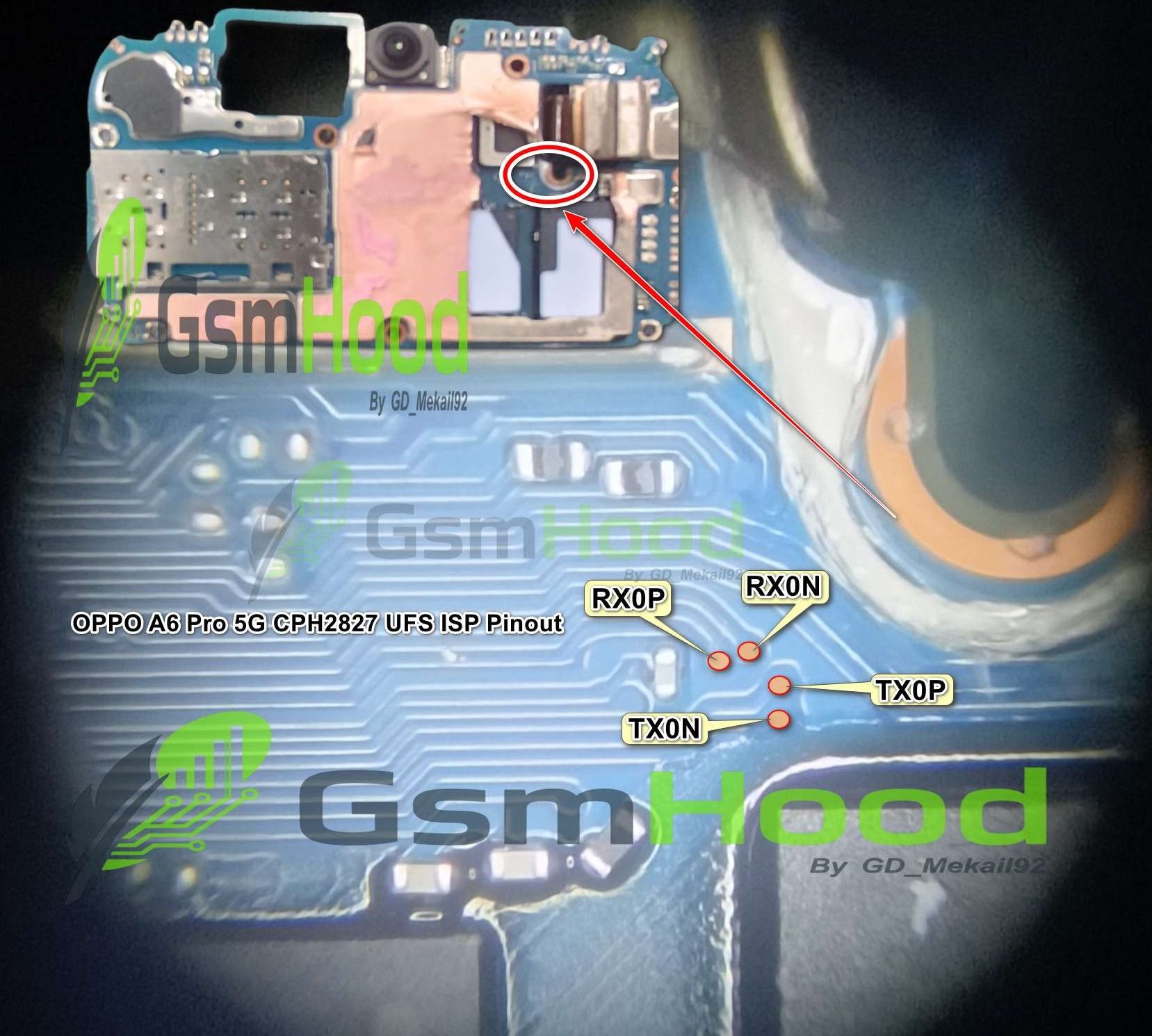
If you are looking for the OPPO A6 Pro 5G CPH2827 UFS ISP Pinout, you are in the right place. This guide provides information about the UFS ISP pinout and test point of the OPPO A6 Pro 5G CPH2827 for professional mobile repair technicians.
If you are looking for the OPPO A6 Pro 5G CPH2827 UFS ISP Pinout, you are in the right place. This guide provides information about the UFS ISP pinout and test point of the OPPO A6 Pro 5G CPH2827 for professional mobile repair technicians.
The OPPO A6 Pro 5G CPH2827 ,The ISP connection can be useful for advanced UFS-level repair, flashing, dead boot recovery and motherboard troubleshooting.
Direct Link – OPPO-A6-Pro-5-G-CPH2827-UFS-ISP-Pinout-Tested-By-Mekail92.jpg
📱 OPPO A6 Pro 5G CPH2827 Device Information:
- Device Name: OPPO A6 Pro 5G
- Model Number: CPH2827
- Chipset: MediaTek Dimensity 6300
- Storage: UFS 2.2
- Operating System: ColorOS 15
- ISP Interface: UFS ISP
🛠️ OPPO CPH2827 UFS ISP Pinout Uses
The CPH2827 UFS ISP Pinout can be useful for professional technicians performing advanced motherboard-level services, including:
- UFS chip detection
- UFS data access
- Firmware and software recovery
- Dead boot repair
- Bootloop troubleshooting
- UFS storage diagnosis
- Motherboard-level repair
- Remove FRP Lock
⚙️ Required Tools
- UFS-supported repair box [I used Z3x easyJtag ]
- UFS ISP adapter
- Fine jumper wires or ISP probes
- Microscope for accurate motherboard inspection
- Suitable USB cable and drivers
- Required OPPO firmware for recovery or flashing
🧰 How to Use OPPO A6 Pro 5G CPH2827 UFS ISP Pinout
- Power off the OPPO A6 Pro 5G completely.
- Disassemble the device and carefully access the motherboard.
- Locate the UFS ISP points shown in the pinout diagram.
- Clean the ISP connection points before connecting the wires or probes.
- Connect the UFS repair tool according to the provided diagram.
- Double-check all connections and voltage requirements.
- Open the supported UFS programming software and detect the UFS storage.
- Perform the required repair, backup or flashing operation.
📌 CPH2827 UFS ISP Pinout for Repair
The OPPO A6 Pro 5G CPH2827 UFS ISP Pinout is mainly useful when normal USB communication is unavailable or when advanced UFS-level servicing is required. Professional tools such as UFI, Easy JTAG and other supported UFS programmers may be used according to their respective hardware and software requirements.
⚠️ Important Warning
- ISP repair requires professional hardware-level knowledge.
- Incorrect connections can damage the UFS chip or motherboard.
- Always verify the exact model and motherboard revision.
- Do not apply incorrect voltage to the UFS lines.
- Create a backup whenever possible before modifying storage data.
The OPPO A6 Pro 5G CPH2827 UFS ISP Pinout Diagram can be a useful reference for mobile repair technicians working on UFS detection, flashing, dead boot recovery and motherboard-level troubleshooting. Always verify the pinout carefully before connecting your repair equipment.
For more UFS ISP Pinouts, Test Points, Flash Files and Mobile Repair Solutions, visit GSMHood.com.
Keep visiting GSMHood.com for more latest ISP pinout diagrams, UFS test points, firmware and mobile repair resources.