Samsung Galaxy M05 SM-M055F ISP Pinout
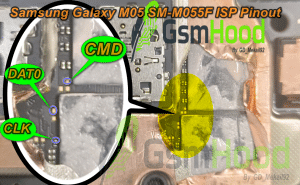
Samsung Galaxy M05 SM-M055F ISP Pinout
Looking for the Samsung Galaxy M05 SM-M055F ISP Pinout? In this post, we are sharing the ISP pinout reference for the Samsung Galaxy M05 with model number SM-M055F. This information can be useful for professional mobile repair technicians working on motherboard-level servicing, storage access, flashing and dead boot recovery.
The Samsung Galaxy M05 SM-M055F ISP Pinout can help technicians identify the required connection points when direct access to the device storage is needed. Public mobile-repair references also list an ISP pinout specifically for the SM-M055F / Galaxy M05 model.
Samsung Galaxy M05 SM-M055F Device Information
- Brand: Samsung
- Device: Samsung Galaxy M05
- Model Number: SM-M055F
- Service: ISP Pinout / Motherboard Repair/Frp remove/Unlock
- Pinout Type: ISP
🔌 Samsung Galaxy M05 SM-M055F ISP Pinout Diagram
Below is the Samsung Galaxy M05 SM-M055F ISP Pinout Diagram. Use the provided image to identify the required ISP connection points on the motherboard before connecting a supported professional repair tool.

Important: Always compare the motherboard and storage configuration before making any ISP connection. Different board revisions may require verification before repair.
Samsung M05 SM-M055F ISP Pinout Uses
The SM-M055F ISP Pinout can be useful for professional technicians performing advanced motherboard-level servicing. Depending on the supported hardware and software, ISP access may be used for storage detection, backup, recovery and other repair operations.
- ISP connection
- Storage detection
- Firmware recovery
- Dead boot troubleshooting
- Bootloop-related repair
- Storage backup and servicing
- Motherboard-level diagnosis
Required Tools
- Supported ISP/eMMC repair box
- ISP adapter or suitable connection setup
- Fine jumper wires or ISP probes
- Microscope for motherboard inspection
- Compatible USB drivers
- Required Samsung firmware
How to Use Samsung M05 SM-M055F ISP Pinout
- Power off the Samsung Galaxy M05 completely.
- Disassemble the phone carefully and access the motherboard.
- Locate the ISP points shown in the pinout image.
- Clean the connection points before connecting wires or probes.
- Connect the supported repair tool according to the diagram.
- Check every connection and required voltage before applying power.
- Detect the storage using the supported repair software.
- Perform the required backup, recovery or flashing operation.
Samsung Galaxy M05 SM-M055F ISP Connection
The Samsung Galaxy M05 SM-M055F ISP connection should be made carefully according to the supplied diagram. ISP work is a motherboard-level procedure, so accurate identification of the connection points is important before using any professional repair equipment.
Technicians using UFI, Easy JTAG or another supported programmer should select the appropriate storage interface and follow the hardware requirements of their particular tool.
Important Warning
The Samsung M05 SM-M055F ISP Pinout is intended for experienced mobile repair technicians. Incorrect wiring, wrong voltage or accidental short circuits can damage the storage chip or motherboard. Always verify the exact board revision and connection points before starting the repair.
Samsung Galaxy M05 Dead Boot Repair
For devices that are not responding normally through USB, an ISP connection may provide another hardware-level diagnostic or servicing route when supported by the repair equipment. The exact repair procedure depends on the condition of the motherboard, storage and software configuration.
The Samsung Galaxy M05 SM-M055F ISP Pinout is a useful reference for mobile repair technicians working on storage access, flashing, dead boot troubleshooting and motherboard-level servicing. Before starting any repair, carefully verify the model number, motherboard revision and ISP points shown in the diagram.
For more Samsung ISP Pinouts, eMMC Pinouts, UFS Pinouts, Test Points, Flash Files and Mobile Repair Solutions, visit GSMHood.com.
Keep visiting GSMHood.com for more tested mobile repair resources, ISP pinout diagrams and firmware solutions.