
Samsung A37 5G ISP Pinout (SM-A376E / SM-A376B) Tested on EasyJtag Box
Samsung A37 5G ISP Pinout (SM-A376E / SM-A376B) Tested on EasyJtag Box
Welcome to GsmHood.com. If you are looking for a 100% working and safe Samsung A37 5G ISP Pinout diagram tested on EasyJtag Box, you have come to the right place. In this guide, we provide the official high-resolution UFS ISP pinout points for both SM-A376E and SM-A376B models.
Using this verified connection diagram, you can easily connect your device to advanced hardware tools like EasyJtag Plus Box, UFI Box UFS Prog, MIPI Tester, or Medusa Pro II for advanced software flashing, unlocking, and hardware repairs.
Why Do You Need Samsung A37 5G ISP Pinout?
Hardware experts and GSM technicians require the Samsung A37 5G ISP Pinout connection when the device is completely bricked or when traditional USB flashing methods fail. Since this device uses a modern UFS chip, this hardware method helps you perform the following tasks directly on the storage IC:
Dead Boot Repair: Easily fix devices stuck on a black screen or bootloops caused by corrupted UFS firmware.
FRP Bypass: Completely reset the Google Factory Reset Protection lock safely without any expensive server authorization.
UFS Partition Backup: Recover critical security data partitions before rewriting the configuration sections.
Samsung A37 5G (SM-A376E / SM-A376B) ISP Pinout Image
Below is the verified and high-quality image showing the exact hardware jumper locations on the motherboard. Make sure you use a high-quality microscope and a fine-tip soldering iron to prevent accidental board damage.

Direct Link For Image – Samsung A37 5G ISP Pinout Tested by Mekail92
How to Connect Samsung A37 5G to EasyJtag Box or UFS Tools
1. Carefully disassemble the phone’s back panel and remove the main motherboard shield.
2. Locate the precise UFS data lines (TXOP, TXON, RXOP, RXON) diagram.
3. Solder jumper wires to the respective UFS pinouts with extreme caution.
4. Connect the wires to your preferred EasyJtag Box UFS socket or interface box adapter.
5. Provide stable power to the device by plugging in a USB cable or connecting VCC/VCCQ lines.
6. Open your EasyJtag software, select the UFS interface mode, and click on ‘Detect’ to start repairing.Remove Frp..etc
Frequently Asked Questions (FAQs)
Q1: Does this ISP pinout work for both SM-A376E and SM-A376B?
Yes. Both of these variants share the exact same hardware motherboard architecture, so this pinout diagram is 100% compatible.
Q2: Is it safe to perform dead boot repair using EasyJtag Box?
Yes, it is completely safe if you follow the lines precisely. However, always double-check your UFS differential pairs for shorts before powering up the programming box.

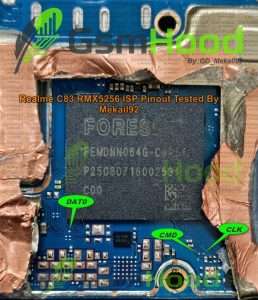

In My Case It was Connected Without Jumpering RST Point,You can also Try and Check