Realme C83 5G (RMX5256) ISP Pinout & FRP Unlock Guide
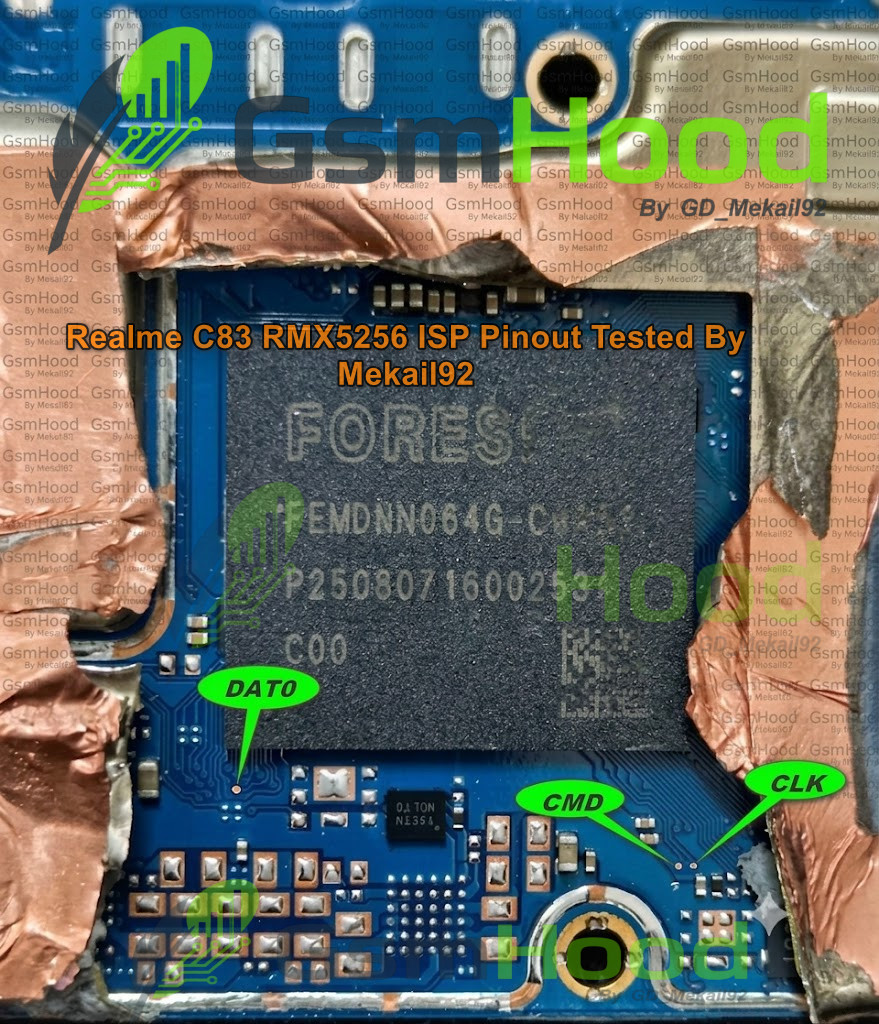
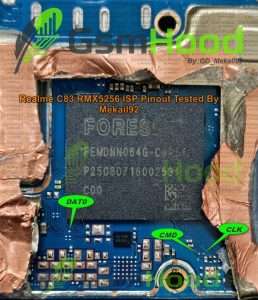
In this article, we are sharing the 100% tested Realme C83 5G RMX5256 ISP Pinout connection diagram. If you are a mobile technician looking to perform hard reset, user lock removal, dead boot repair, or FRP bypass on the Realme C83 5G, this high-quality hardware pinout picture will help you complete the job safely.
Why Do You Need Realme C83 5G ISP Pinout?
When a device is completely locked or stuck on a dead boot, standard USB flashing methods through MTK or Qualcomm tools might fail. By using the Hardware ISP Pinout method, you can connect the device’s eMMC/UFS storage directly to your servicing box without removing the IC from the motherboard. This saves time and reduces the risk of damaging the CPU or RAM.
Supported Tools for Flashing and Unlocking:
You can easily connect this ISP pinout with any popular emmc/ufs toolboxes, including:
- EasyJtag Plus Box
- UFI Box
- Medusa Pro II
- MIPI Tester / F64 Box
Important Connection Points:
Carefully solder the jumper wires to the following required points on the motherboard:
- CLK (Clock)
- CMD (Command)
- DATA 0 (Data)
- GND (Ground)
Note: Always use high-quality jumper wire and flux to avoid accidental shorts. Keep the wire length short for stable data transmission and a successful connection with the box software.
Important Warning⚠️
The Realme C83 5G RMX5256 ISP Pinout is intended for experienced mobile repair technicians. Incorrect connections, wrong voltage or accidental short circuits can damage the motherboard or storage components. Always verify the board revision and pinout before applying power.
Download Realme C83 5G RMX5256 ISP Pinout
For more tested ISP Pinouts, Emmc Pinouts, Test Points, Flash Files and Mobile Repair Solutions, visit GSMHood.com.
Keep visiting GSMHood.com for more tested mobile repair resources, ISP pinout diagrams and firmware solutions.